MiniMax H3
For short, multimodal audiovisual videos and an optional 2K output path. Text, images, video, and audio context; up to 15-second clips; 768p base output with higher-resolution regeneration where available.
Which AI video model should you choose?
MiniMax H3 and Seedance 2.0 take different approaches to multimodal video creation. MiniMax H3 offers native audiovisual generation, an optional 2K regeneration workflow, and downloadable base-model weights subject to licensing. Seedance 2.0 focuses on directed short-form scenes, multi-shot storytelling, and text, image, video, and audio guidance in supported Topview workflows. Need a lower-cost concept preview? Seedance 2.0 Mini is included as a third option.
Compare all three on ten practical video briefs, then decide which workflow fits your quality requirements, available settings, and credit budget.
MiniMax H3
For short, multimodal audiovisual videos and an optional 2K output path. Text, images, video, and audio context; up to 15-second clips; 768p base output with higher-resolution regeneration where available.
Seedance 2.0
For directed short-form production and multi-shot audiovisual scenes. 4–15-second clips in supported workflows; reference-guided action, dialogue, and camera direction.
Seedance 2.0 Mini
For compact concept tests and quick visual previews. A lightweight workflow for checking visual direction and prompts before committing to a longer or more capable generation.
10 creative briefs · 3 model options · 30 outputs displayed on the current comparison page
Topview offers different generation modes and plans. Confirm the model, credits, reference formats, and export settings available in your account before rendering.
The key differences involve resolution workflows, model access, creative control, and the settings actually available in Topview.
| Feature | MiniMax H3 | Seedance 2.0 | Seedance 2.0 Mini |
|---|---|---|---|
| Developer | MiniMax | ByteDance | ByteDance |
| Model / workflow | Omni-modal audiovisual model | Multimodal AI video workflow | Lightweight preview workflow |
| Main use | Reference-led audiovisual clips and 2K regeneration | Directed short videos and multi-shot storytelling | Drafts and visual concept previews |
| Duration | 5–15s per shot in Topview | 4–15s per shot in Topview | 4–15s per shot in Topview |
| Resolution | Default 768p; up to 2K via H3-Regenerate-2K where enabled | 480p / 720p / 1080p / 4K in Topview | 480p / 720p in Topview |
| Text-to-video | Supported | Supported | Supported |
| Image-to-video | Supported | Supported | Supported |
| Image references | Up to 9 | Up to 9 | Up to 3 |
| Video references | Up to 3 | Up to 3 | Need to be verified |
| Audio references | Up to 3 | Up to 3 | Need to be verified |
| Combined reference files | Up to 12 | Up to 15 | Mode-dependent |
| Reference duration rules | Video combined ≤15s; audio combined ≤15s; audio cannot be the only reference input | Check sound-specific input-duration restrictions | Check current preset |
| Generated audio | Native 32 kHz stereo audiovisual output | Native sound supported in API | Same native audio pipeline as Seedance 2.0 |
| Lip-sync | H3 officially documents 11 stable dialogue languages | Multilingual dialogue and lip-sync in supported workflows | Verify mode and account |
| Higher-resolution process | H3-Base output followed by in-context 2K regeneration | Verify native generation vs separate export/upscaling | Not positioned for 2K or 4K |
| Model weights / deployment | Base-model weights released; license and territory restrictions apply | Topview-hosted model workflow | Topview-hosted preview workflow |
| Pricing | Per-second credits vary by tier and mode | Per-second credits vary by tier and mode | Per-second credits vary by tier and mode |
| Best starting point | 2K-oriented short clips or licensed custom pipelines | Story-driven clips with camera/action instructions | Early-stage prompt and framing tests |
Choose the model that fits your actual creative brief—not whichever promises the most impressive specification.
Generate at H3's base resolution, then use the supported H3-Regenerate-2K workflow when a higher-resolution deliverable is required. Confirm that the selected Topview mode includes this stage.
H3 generates video and stereo audio together, with documented stable dialogue support across 11 languages. Use it for character performances, short explainers, and audiovisual concepts where speech or atmosphere matters.
Use supported images, videos, and audio references in one H3 omni-reference brief, within the overall 12-file limit and combined-duration restrictions.
Explore published H3 base-model weights for local integration or customization, subject to the MiniMax H3 Community License, territorial limits, technical requirements, and any necessary additional permissions. Topview-hosted access is not the same as a local deployment license.
Specify camera angles, scene changes, actions, and pacing for a compact narrative or product story, then evaluate whether the result follows each planned beat.
Use the supported omni-reference workflow to connect visual identity, movement cues, and sound, with documented reference caps.
Create short conversations, skits, and explainers with coordinated dialogue and natural actions. Verify actual lip-sync and speaker accuracy rather than relying only on feature claims.
Generate audiovisual clips and refine the prompt for shot composition, continuity, and delivery quality. Confirm native export resolution in your chosen Topview mode.
Use short drafts to check the opening hook, subject appearance, motion, lighting, or camera angle before moving to a more capable generation workflow.
Animate a simple reference image with a focused instruction. Avoid overloading a short preview with a complex multi-shot narrative.
Explore multiple short concepts for vertical social formats, ecommerce product ideas, and client pitches. Check current duration, sound, and reference availability rather than assuming parity with full Seedance 2.0.
Same intended creative challenge. Three model workflows. Review the outputs—not just the marketing claims.
These ten scenarios cover educational storytelling, image-to-video, UGC-style performance, emotional cinematography, object consistency, ecommerce demonstrations, animation, video-reference transfer, constrained lip-sync, and storyboard-guided multimodal scenes. Each card retains its existing prompt, original reference assets, and three displayed outputs.
A fictional ancient city submerged beneath the sea. The prompt moves from dark underwater ruins and carved columns through archival-style imagery to an imagined reconstruction and a final mysterious wide shot.
Educational short videos need a sequence of intelligible visual ideas. This example tests whether the model can translate a compact storyline into recognizable beats rather than unrelated atmospheric clips.
Choose MiniMax H3 when the short needs a readable sequence. Its 15.1-second file moves from submerged columns, to a desk of archival maps, to a ruined temple, and then to a lit reconstructed city. Seedance 2.0 also runs 15.0 seconds and shows a column, a carved artifact, and relief walls, but the last frames stay on similar carvings instead of opening into a final wide city. Seedance 2.0 Mini runs 15.1 seconds and does reach a lit city, yet the middle frames are maps and diagrams rather than one continuous underwater setting. Use H3 for the discovery-to-reconstruction arc.
Create a cinematic knowledge short about a fictional lost ancient city beneath the ocean. Use a clear timeline: dark underwater ruins, drifting particles, carved stone columns, a brief archival-style visual montage, an imagined city reconstruction, and a final mysterious wide shot. Keep the tone investigative and cinematic. No platform names, no logos, no readable brand text, no real channel identity.
A small white kitten enters a bright room from off-screen, moves beneath a clothing rack, pauses, and settles near the window. The uploaded image is the visual reference for layout, furniture, light, and the camera's left-to-right movement.
A fictional fitness creator runs beside a beach at sunrise, slows down, smiles, adjusts their hair, and continues. The reference image defines the person's general outfit colors, appearance, and body type.
A bundled traveler and gentle snow guardian stand outside a snowy cave and release a white bird into the forest sky. The concept image defines their positions, relative size, lantern glow, and restrained mood.
A white ceramic vessel rotates on a fixed stone base. Its lid opens; a smaller intact vessel rises out, pauses, descends, and the outer lid closes. The two images define the exact look of the outer and inner objects.
A fictional adult presenter enters an apartment balcony, adjusts a drying rack, hangs plain garments, and points to a compact storage area. The references define the balcony and the presenter's appearance.
An original beginner hockey player enters an indoor rink, attempts a trick, loses balance, slides safely, and sits up smiling. Three references define the player, unbranded orange jersey, and rink.
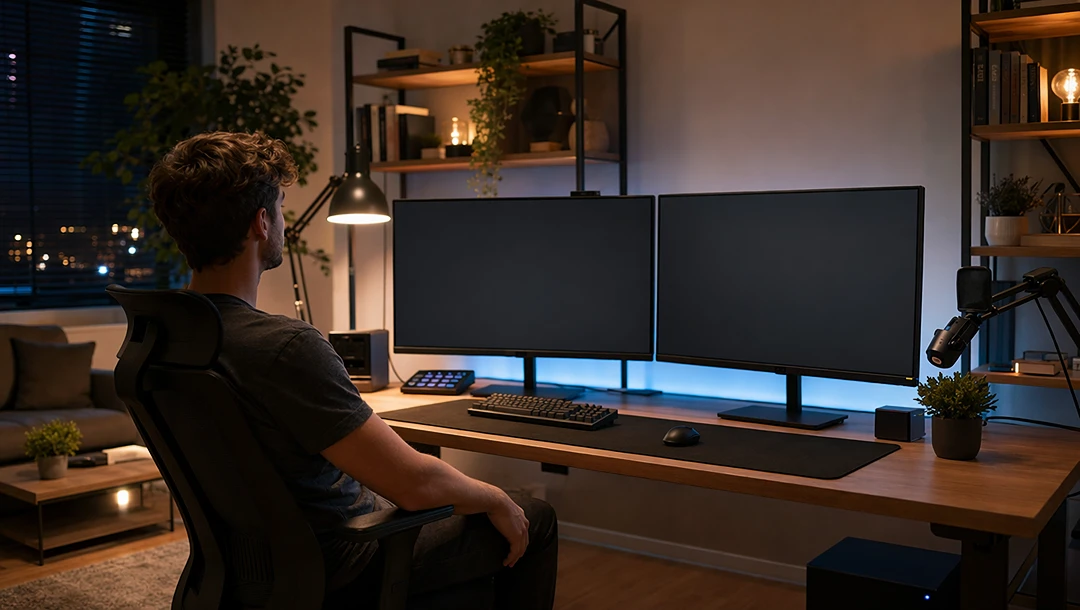
A seated creator remains in a room while two visible screens display matching montage footage taken from an input video. The reference image defines room composition and the input video defines screen content.
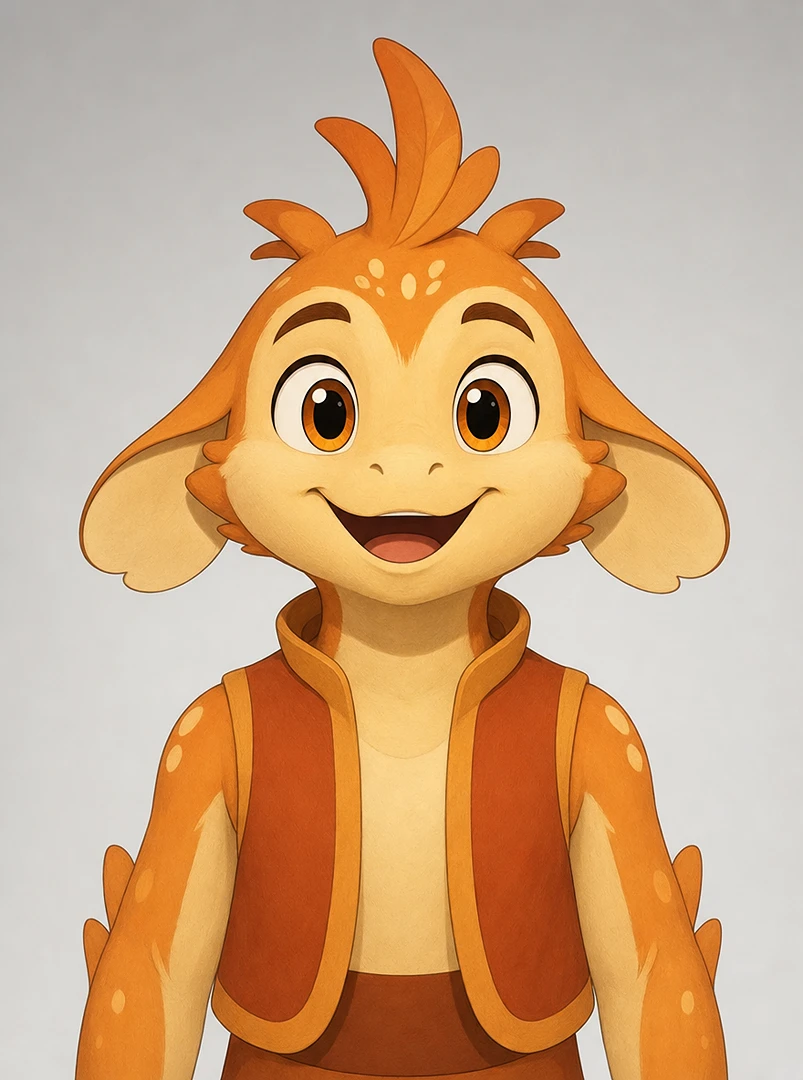
Keep an existing character video as stable as possible while changing the mouth movement to match a separate dialogue recording. The image is for identity, the video defines the source scene, and the audio is the lip-sync target.
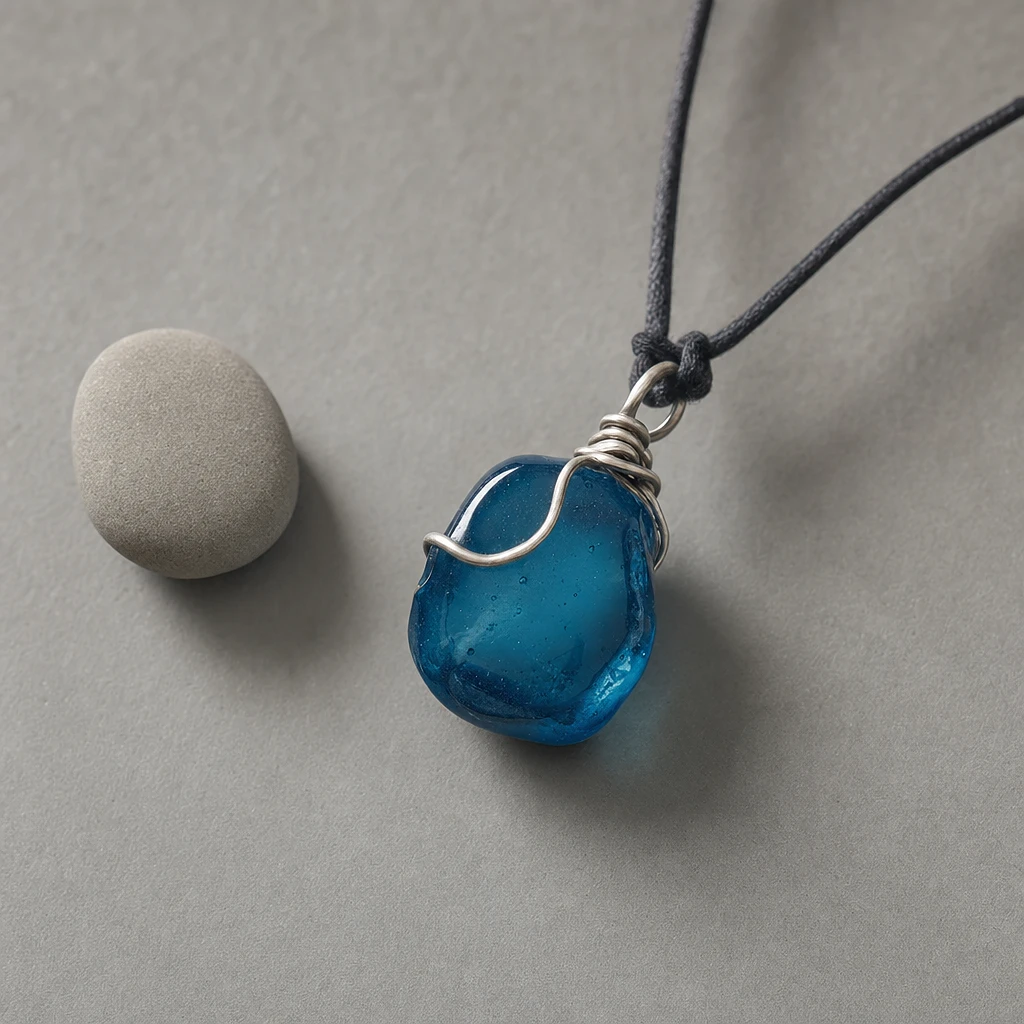
Two original young adult characters meet near a venue entrance. Character A drops a small blue charm, Character B retrieves it, and the audio begins as they share a brief emotional moment. The references supply the environment, storyboard, two character identities, charm, performance timing for each character, and an audio cue.
A useful model comparison explains not only what looks good, but what was actually tested.
We recorded the full submitted prompt, reference files, model identifier, generation mode, account or API route, requested duration, aspect ratio, resolution, and audio setting for every output.
We kept prompts and input files identical where the workflows support them. Video and audio reference support for Seedance 2.0 Mini needs to be verified on the active preset, so we only used images as references in these tests.
We checked whether essential actions, subjects, camera instructions, shot order, and ending conditions were completed.
For image-led or multimodal cases, we compared character identity, product features, environments, and object shapes with the original assets.
We reviewed movement realism, scene transitions, spatial relationships, and cause-and-effect across the clip.
For audio-enabled workflows, we compared speaking roles, spoken text, timing, sound effects, and preservation of the supplied audio.
We recorded every submitted task, including failed attempts and content rejections. Separate technical completion rate from the percentage of outputs that pass a quality standard. Measure median elapsed time only from real task logs.
The existing video pairs show what happened for specific creative briefs. Without consistent input configurations, complete task records, and documented evaluation, they do not establish that any one model is universally faster, cheaper, or higher quality.
Compare actual credit quotes and output requirements—not the lowest number without context.
Topview publishes model/API reference pricing, but prices can vary by plan, variant, generation mode, reference assets, and current promotions.
| Model and output tier | Published reference price |
|---|---|
| MiniMax H3 — 480p | 0.15 credits per second |
| MiniMax H3 — 768p | 0.30 credits per second |
| MiniMax H3 — 2K | 0.60 credits per second |
| Seedance 2.0 — 480p | 0.50 credits per second |
| Seedance 2.0 — 720p | 1.00 credits per second |
| Seedance 2.0 — 1080p | 2.50 credits per second |
| Seedance 2.0 — 4K | 7.00 credits per second |
| Seedance 2.0 Mini — 480p | 0.28 credits per second |
| Seedance 2.0 Mini — 720p | 0.52 credits per second |
MiniMax H3 and Seedance 2.0 have different output dimensions; 768p is not the same resolution as 720p. The 1440p H3 tier corresponds to its supported higher-resolution workflow rather than a one-pass 2K H3-Base render. Verify that the same account type and billing conditions apply before making a direct price claim.
A less expensive generation can still cost more per finished video when repeated attempts are necessary.
Cost per usable clip = total credits consumed / number of outputs meeting the predefined quality requirement.
Do not publish usable-output counts, completion rates, or median wait times for Topview's ten cases without real logs.
Choose by your required output, not by a universal model ranking.
If the creative brief fits a 15-second output and a supported higher-resolution regeneration workflow is available, compare H3 for fine-detail commercial work.
Teams with eligible usage rights and sufficient hardware may use H3 base-model weights for local integration. Review territorial restrictions, separate authorization requirements, and the limitations of the publicly released components.
When your goal depends on a compact sequence of scenes, actor interactions, or a planned set of camera and sound cues, compare Seedance 2.0's supported workflow and actual output.
When the main question is whether the visual idea works, begin with a simple preview. Save the successful prompt and source files, then re-generate in another model when needed. The result will not necessarily be visually identical.
Three creative workflows. One clearer way to choose.
Explore MiniMax H3 for audiovisual generation, 2K-oriented short outputs, or eligible model-weight integrations. Choose Seedance 2.0 for directed scenes and short narrative production. Start with Seedance 2.0 Mini when you need to test a simple concept.
Compare the actual input compatibility, output quality, and credit cost before you commit to a final deliverable.
Single-reference animation is a practical workflow for social clips and lightweight creative production. It reveals how a model handles motion without losing the source image's composition.
Choose Seedance 2.0 Mini for this brief. In the 5.1-second file a white kitten enters from the left, passes under the clothing rack, and settles on the sunlit floor while the rack, windows, and light direction stay in place. MiniMax H3 (5.2 seconds) and Seedance 2.0 (5.0 seconds) preserve that same room, but the kitten does not appear in the sampled frames, so the shot stays an empty interior. Use H3 or Seedance 2.0 only when holding the still layout matters more than the animal action.
Image reference 1
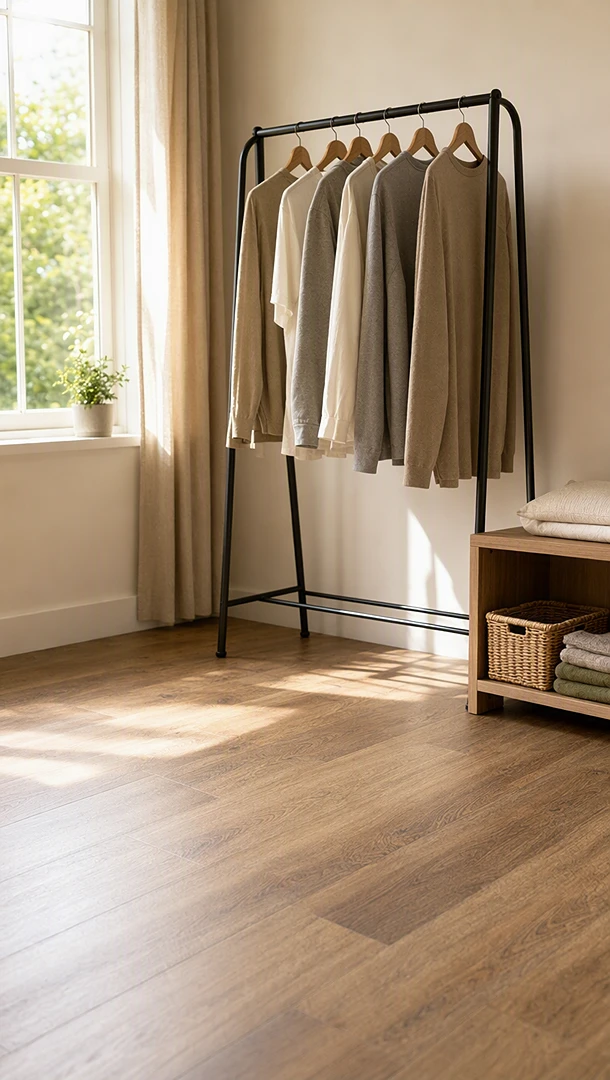
Use @image1 as the home interior first-frame reference. Create a gentle left-to-right camera move. A small white kitten runs in from off-screen, slips under the clothing rack, pauses, looks around, and settles playfully near the window light. Preserve the room layout, camera direction, lighting, and furniture placement. No logos, no readable text, no branded objects.
Creator-style videos often depend on small, familiar human actions. Subtle motion and identity stability matter more than elaborate special effects.
Choose MiniMax H3 when the ponytail has to be brushed. The 15.1-second file keeps the teal top and sunrise beach, slows into a closer view, and shows a hand brushing the ponytail. Seedance 2.0, also 15.1 seconds, keeps the outfit and a running stride with a smile, and brushes the bangs at the forehead instead of the ponytail. Seedance 2.0 Mini, 15.1 seconds, holds the clearest continuous run and the same outfit colors, and also brushes those front bangs rather than the ponytail. Use H3 when the ponytail beat matters, and Mini for a simpler running preview.
Image reference 1
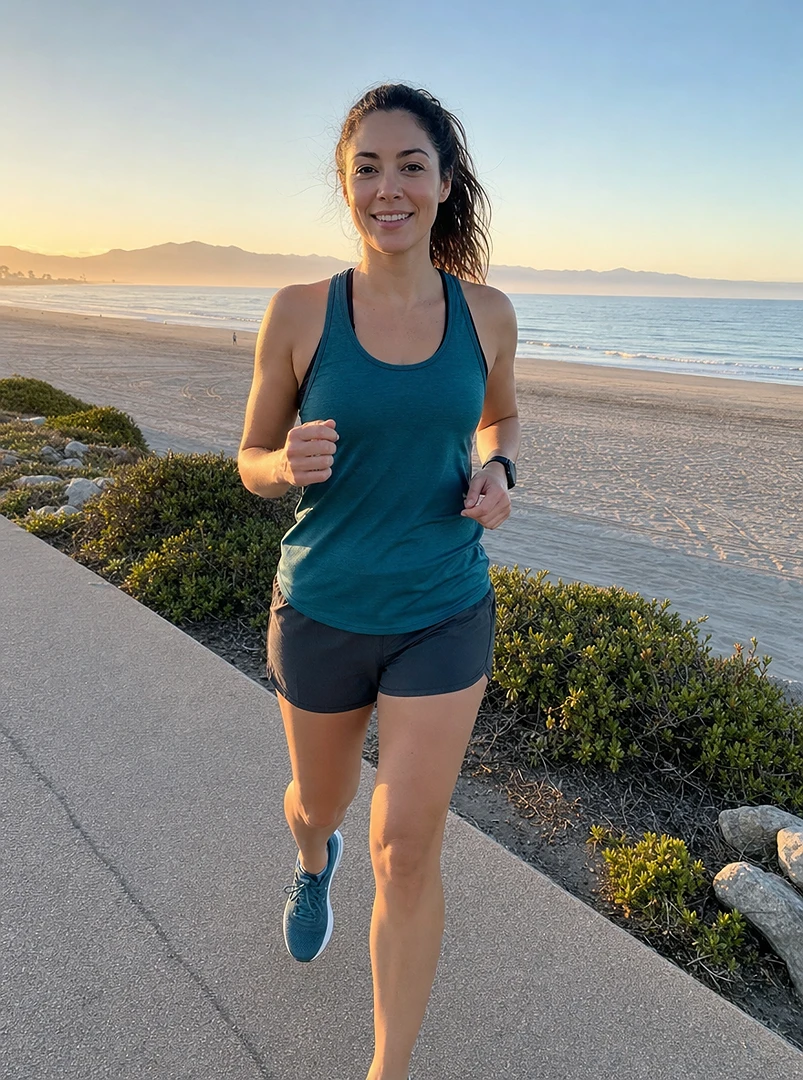
Use @image1 as the fictional runner reference. Generate a lifestyle fitness video where the runner jogs along a bright beach path at sunrise, slows down, smiles, adjusts their hair, and continues running. Preserve the broad outfit colors, body type, and appearance from the reference while keeping motion natural. No logos, no branded clothing, no readable text, no real-person identity.
Emotion-led cinematic scenes rely on controlled composition and precise small actions, not just detailed backgrounds.
Choose Seedance 2.0 when the mood depends on visible weather. Its 6.0-second file keeps the traveler, the much larger snow guardian, the cave mouth, the lantern, and a small white bird, with snow falling through the shot. MiniMax H3 runs 6.6 seconds and holds the same scale and placement, with less obvious snowfall in the sampled frames. Seedance 2.0 Mini runs 6.1 seconds and preserves the illustration and the bird, with smaller pose changes. The bird release itself stays subtle in all three files.
Image reference 1
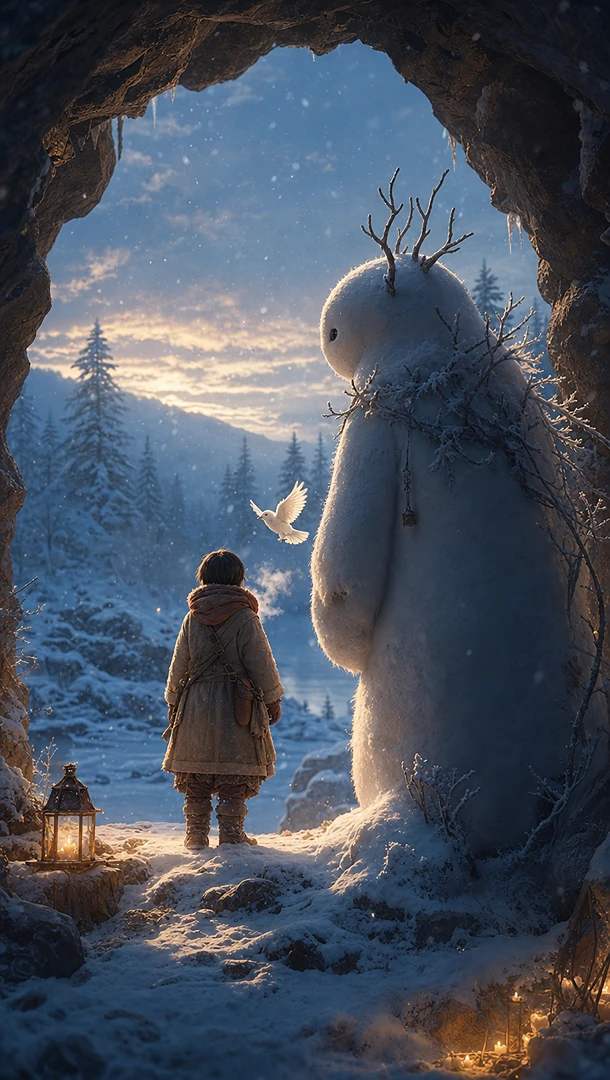
Use @image1 as the complete original winter cave concept reference. Create a slow cinematic shot: the small bundled traveler and the gentle snow guardian stand at the snowy cave entrance, quietly releasing the white bird into the cold forest sky. Keep the cave, snow, lantern glow, character positions, scale relationship, and restrained emotional tone consistent. Use only natural wind, snow, cloth, breathing, and wing sounds. No existing IP characters, no logos, no readable text.
Product and object demonstrations often fail when a model cannot preserve separate parts or follow a sequence of constrained movements.
Choose MiniMax H3 only if a lid change is enough. Over 12.3 seconds the outer vessel stays on the stone base and the lid lifts, leaving a dark gap, but the sampled frames never show a smaller intact vessel rising out and returning. Seedance 2.0 (12.1 seconds) and Seedance 2.0 Mini (12.1 seconds) do go through the full lid sequence of opening, rising, and closing, but on both the lid leaves the frame during the rise.
Image reference 1
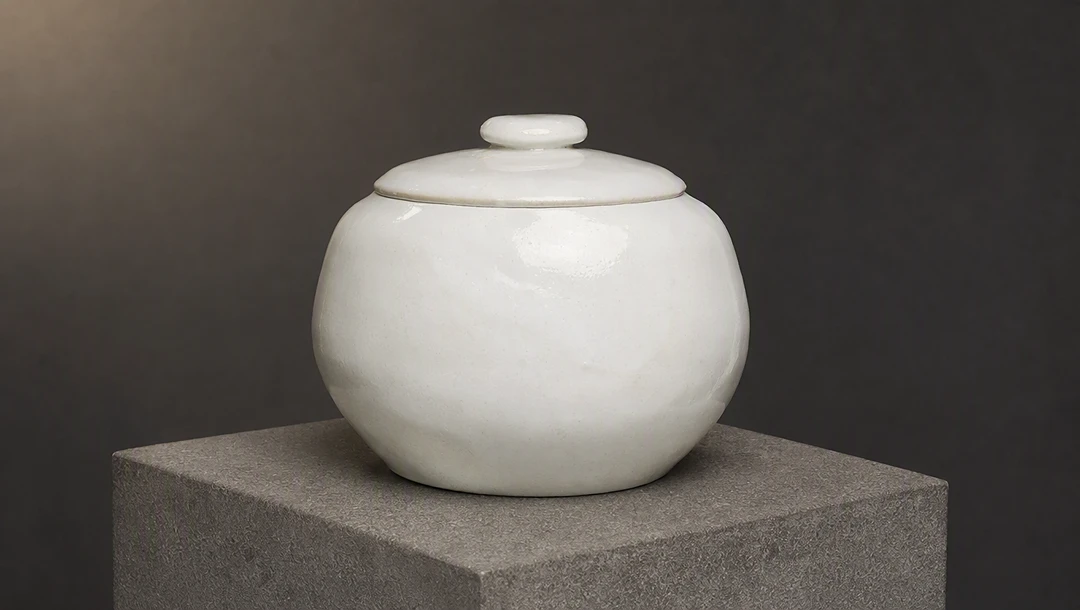
Image reference 2
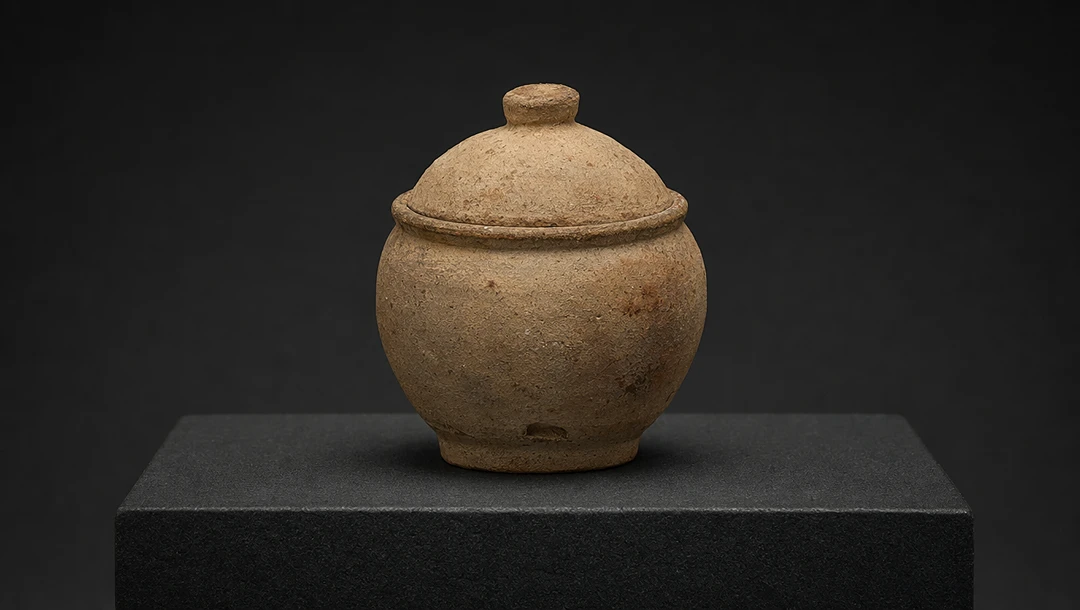
Use @image1 as the outer white ceramic vessel reference and @image2 as the smaller inner ceramic vessel reference. In a dark museum-grade studio, the outer vessel rotates slowly on a static stone base. Its lid opens, the complete inner vessel rises as one intact object, pauses in the air, then descends back inside, and the lid closes. The outer vessel must keep rotating throughout; the stone base must remain still; the inner vessel's lid must never separate. No logos, no labels, no readable text, no background music.
Ecommerce demos need faithful products and legible use actions. Attractive lighting alone cannot compensate for a rack that changes size or function.
Choose Seedance 2.0 for the product demo. The 15.1-second file shows the presenter entering the balcony, handling a garment at the rack, and standing beside clothes that are on the rails, while the rack shape stays recognizable. MiniMax H3, also 15.1 seconds, keeps one presenter and the same balcony, and the clothes do finish hanging on the rack, but they shift out of place during the action, leaving a clear flaw. Seedance 2.0 Mini, 15.1 seconds, gets garments onto the rack, yet the presenter is mostly cropped to hands and arms. Use Seedance 2.0 when both the person and the hanging action need to read.
Image reference 1
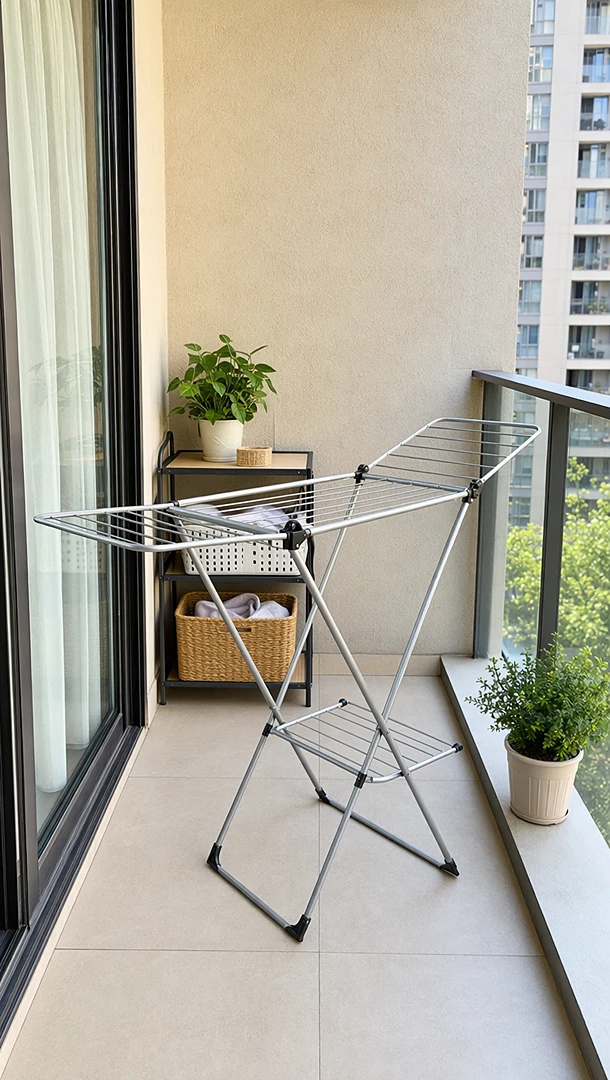
Image reference 2

Use @image1 as the apartment balcony environment reference and @image2 as the fictional adult presenter reference. Generate a home demonstration video where the presenter enters the balcony, adjusts the rack, hangs a few plain garments, and points to the compact storage area. Keep the balcony layout and rack placement consistent, and preserve the presenter's general appearance. Do not add extra rack modules, logos, labels, or readable text.
Short comedic sequences depend on timing and cause-and-effect. If the physical actions are missing, the intended joke may not land.
Choose MiniMax H3 when the character has to stay in frame. The 7.3-second file keeps the full beginner in the orange jersey on the indoor rink, though the sampled frames show skating rather than a clear fall and sit-up smile. Seedance 2.0 runs 7.0 seconds and crops to the legs and stick, so the jersey color survives but the face and the recovery do not. Seedance 2.0 Mini runs 7.1 seconds and leaves the rink almost empty, with only a sliver of orange at the frame edge. None of the three clearly lands the failed-trick sequence.
Image reference 1

Image reference 2
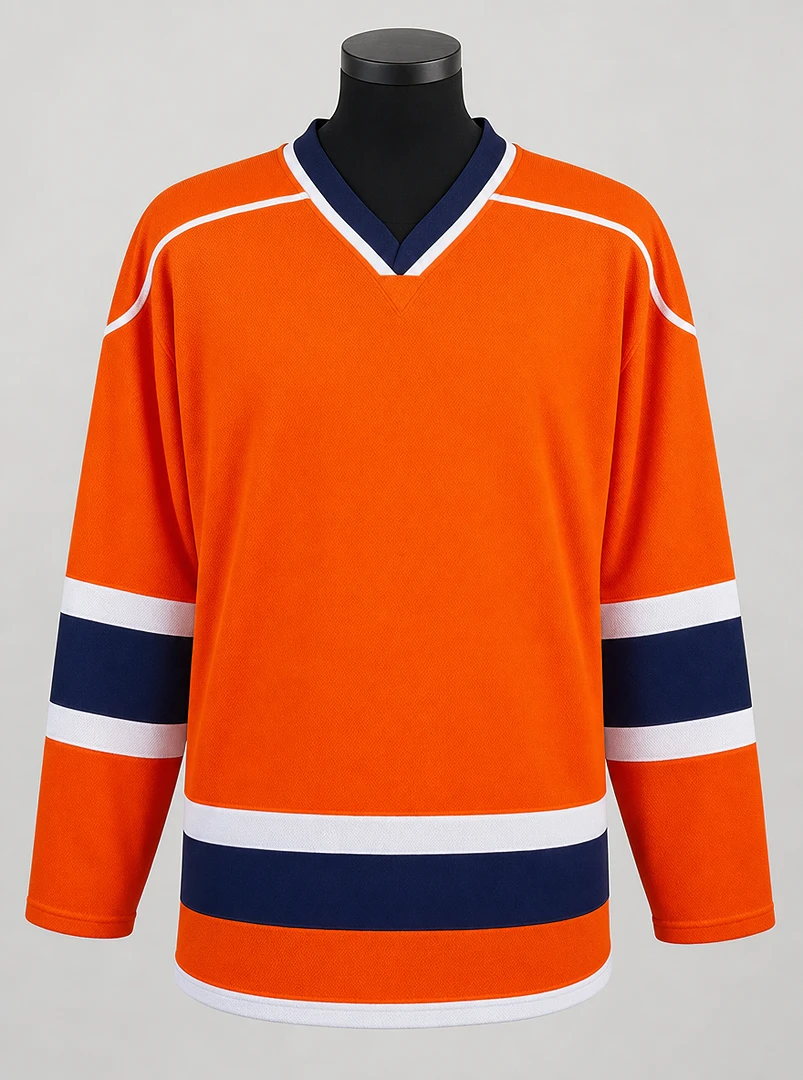
Image reference 3
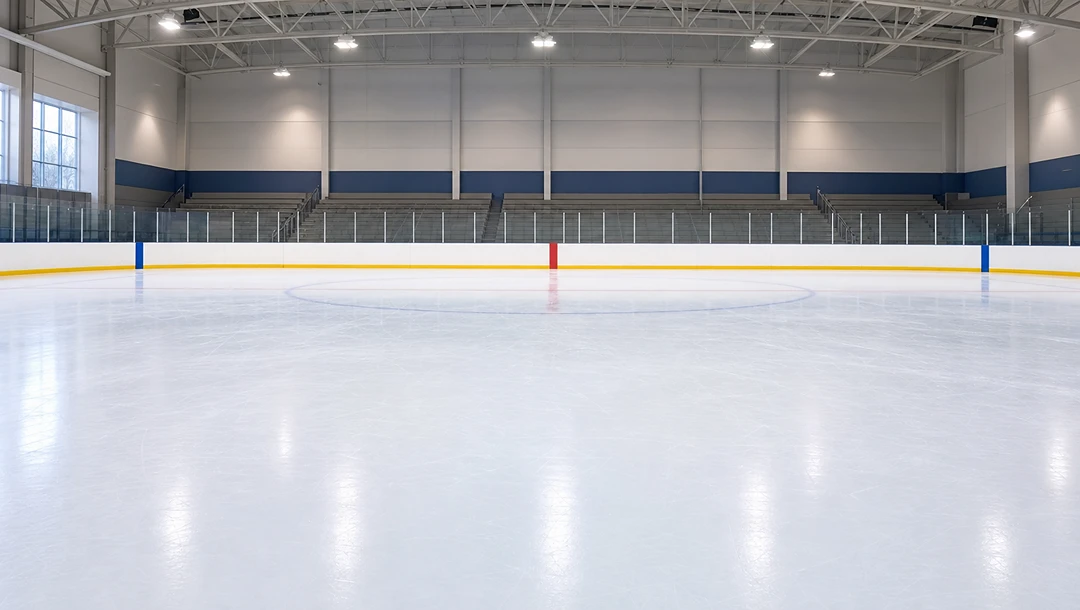
Use @image1 as the beginner hockey player character reference, @image2 as the unbranded orange jersey reference, and @image3 as the generic indoor ice rink reference. Create a playful animated sports-comedy video where the beginner enters confidently, attempts a simple trick, loses balance, slides safely across the ice, then sits up smiling. Preserve the character, jersey colors, and rink layout. No franchise style names, no team logos, no venue names, no readable text.
Embedding a video inside a generated environment is a distinct challenge from ordinary image-to-video. Input compatibility must be verified before any quality comparison is considered fair.
Choose Seedance 2.0 if the room has to stay intact, and do not treat this test as a screen-content win. Its 8.0-second file keeps the seated creator and two monitors, but the screens read as bright blank panels rather than a recognizable montage. MiniMax H3, also 8.0 seconds, starts in that room and then cuts to a waveform and a loading bar. Seedance 2.0 Mini starts in the room and then fills the frame with a mountain landscape that is not the reference footage. All three files exist, so this is not an unsupported-input label; none of them shows the same montage in sync on both screens.
Image reference 1
Video reference 1
Use @image1 as the room keyframe environment and composition reference, and use @video1 as the montage content to embed on the visible screens. Generate a scene where a seated creator remains in the room while two screens play the montage in sync. Keep the camera mostly fixed, preserve the room layout, and make the screen content clear and stable. No platform UI, no logos, no usernames, no readable brand text.
A targeted edit is successful only if it changes the requested feature without rebuilding the rest of the scene. It should not be judged by general visual attractiveness.
Choose MiniMax H3 when you need a visible mouth change without rebuilding the shot. Across 14.4 seconds the character goes from a closed smile to an open smile while the vest, room, and camera stay put. Seedance 2.0 (14.1 seconds) and Seedance 2.0 Mini (15.1 seconds) keep the same character and background, but the mouth stays in a similar open shape in the sampled frames, so the edit is hard to see. Play each clip and listen for how the dialogue sits with the mouth movement.
Image reference 1
Video reference 1
Audio reference
Use @image1 as the character identity reference, @video1 as the source video to preserve, and @audio1 as the dialogue target for lip-sync. Keep the source video's background, lighting, camera, body pose, and facial expression unchanged as much as possible. Modify only the character's mouth movement so it matches the audio naturally. Preserve the character design. No logos, no copyrighted character names, no readable text, no real-person identity.
A reference-dense story asks the model to connect assets with different roles. The core challenge is correctly associating characters, objects, timing cues, and audio rather than merely accepting a large number of files.
Choose MiniMax H3 to check the drop-and-retrieve beat, and choose Seedance 2.0 when you need the longer venue scene. H3 shows two people outside the venue, a view of their feet, a crouch toward a small blue object, and the pair facing each other again, but the file is 5.2 seconds rather than the 15-second target. Seedance 2.0 runs 15.0 seconds and keeps two young adults at a lit doorway, yet the sampled beats are a close hand and a guitar case rather than a charm changing hands. Seedance 2.0 Mini runs 15.1 seconds and shows the meeting plus a crouch, without a clearly consistent blue charm. All three produced a file, so this page does not mark Mini as an unsupported input.
Image reference 1
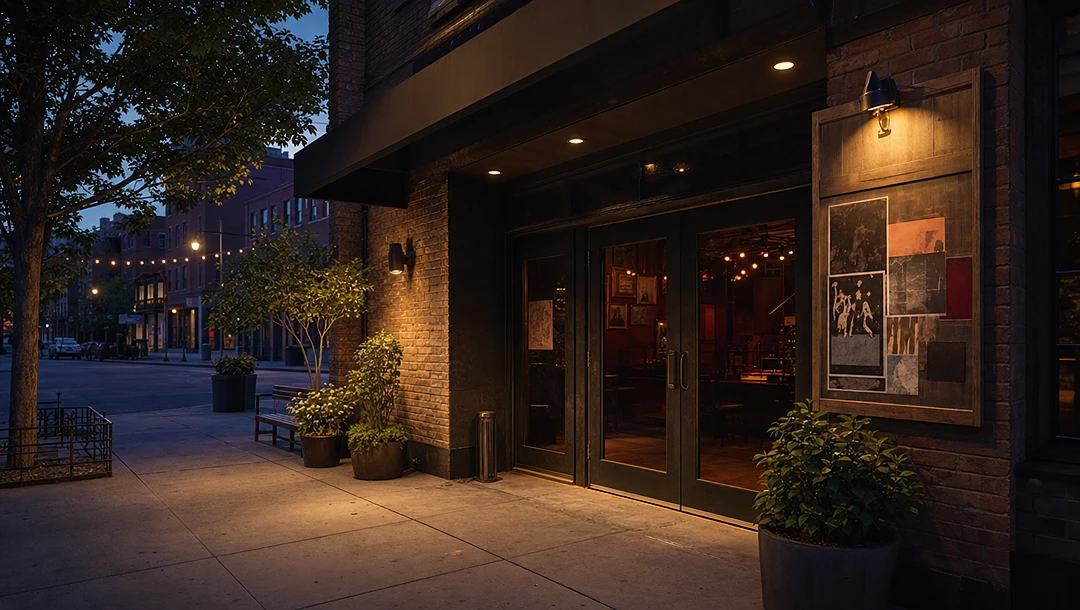
Image reference 2
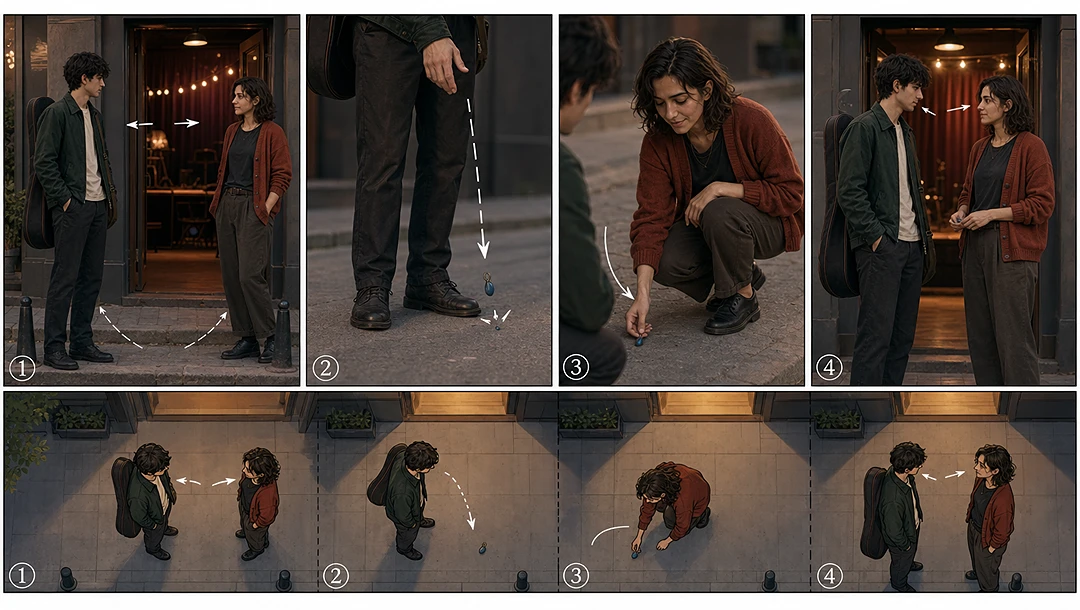
Image reference 3
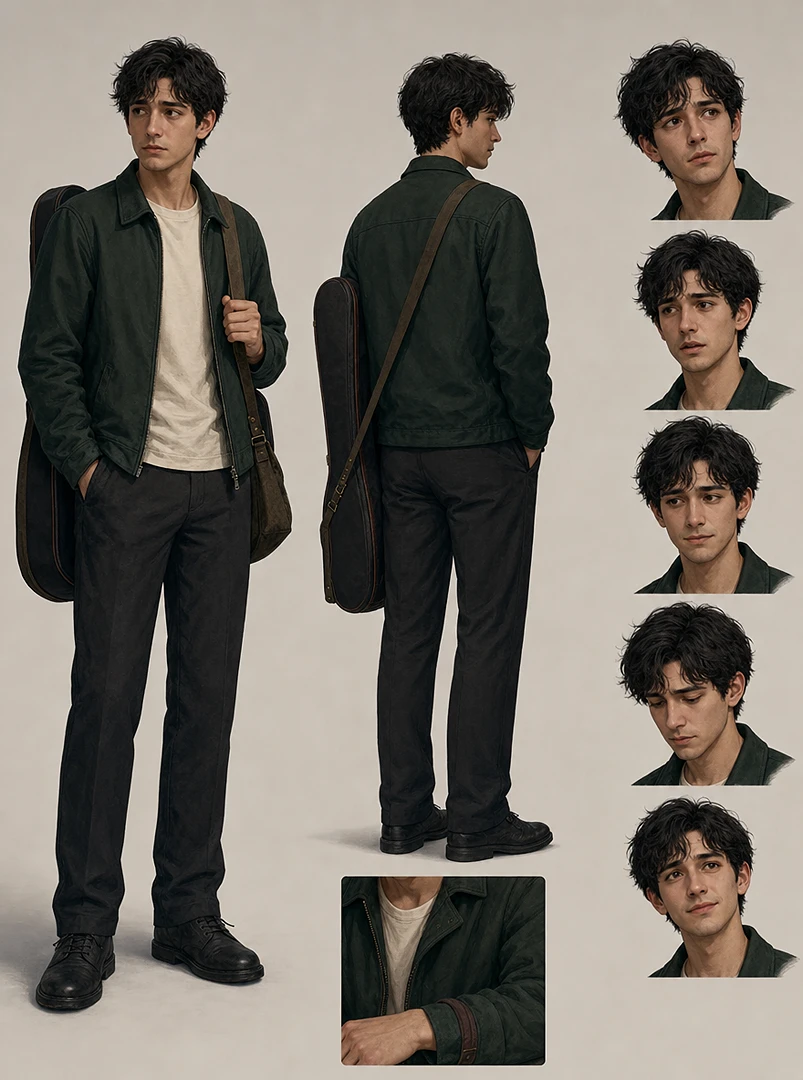
Image reference 4
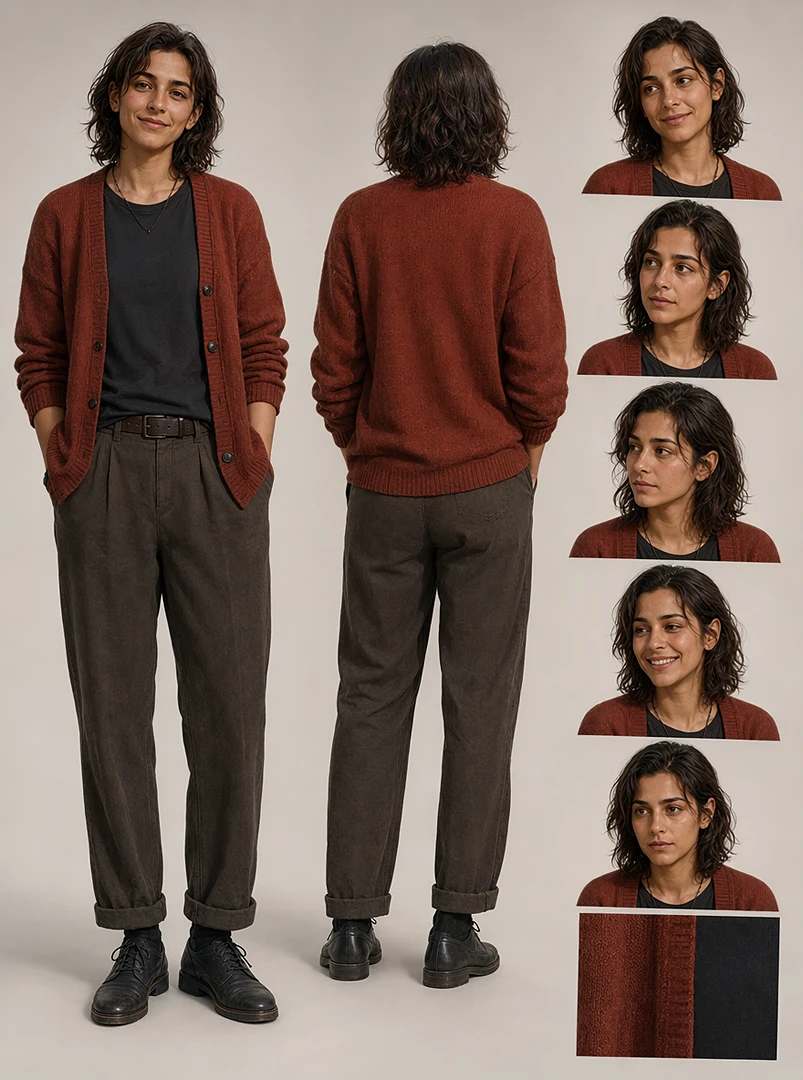
Image reference 5
Video reference 1
Video reference 2
Audio reference
Use @image1 as the exterior venue entrance reference, @image2 as the storyboard and interior layout reference, @image3 as Character A, @image4 as Character B, @image5 as the small blue charm prop, @video1 as Character A's performance timing reference, @video2 as Character B's performance timing reference, and @audio1 as the original in-scene audio cue. Follow the storyboard timing closely: the two original young adult characters meet near the venue entrance, Character A drops the small blue charm, Character B picks it up, and the audio begins as they exchange a brief emotional look. Preserve each character's outfit and position, the venue layout, the prop design, and the timing cues from the performance videos and audio. Do not add or reorder shots. No copyrighted music, no existing character IP, no logos, no readable brand text.